
How Polars achieves a 3x speedup over Pandas through Rust-based parallelism and lazy evaluation.
In modern data pipelines, performance bottlenecks rarely come from algorithms alone; they often stem from the tools we rely on every day. Python libraries like Pandas are the backbone of data processing, but newer alternatives like Polars are rapidly challenging that dominance with claims of significantly better performance.
Pandas has been the default choice for years. But should it still be?
During a recent internal experiment, we set out to evaluate how these two libraries perform under realistic workloads. While our production datasets are protected under strict privacy and non-disclosure agreements, the performance challenges we encountered are far from unique they are shared by many teams working with large-scale data.
To make this study transparent and reproducible, I reconstructed a 10-million-row dataset that closely mirrors the structure and complexity of real-world infrastructure logs. Using this dataset, we benchmark Pandas and Polars across common data engineering tasks to answer a simple but important question:
Is Polars actually faster? If so, why does it matter?
Understanding the Tools: Pandas vs Polars
Pandas
Pandas has been the de facto standard for data manipulation in Python for over a decade. Built on top of NumPy, it provides a flexible and intuitive DataFrame API that powers a vast portion of the data science ecosystem.
However, its design has some limitations, particularly in single-threaded execution and memory efficiency, which can become significant bottlenecks when working with large-scale datasets.
Polars
Polars is a newer DataFrame library designed from the ground up for performance. Written in Rust, it leverages a columnar memory model, multi-threaded execution and lazy evaluation to optimize complex data workflows.
These architectural choices allow Polars to outperform traditional tools in many scenarios, especially when dealing with large datasets and chained transformations.
“With these differences in mind, let’s evaluate how they perform under a 10-million-row workload.”
Experimental Setup
To ensure a fair and reproducible comparison between pandas and Polars, all benchmarks were conducted in a controlled local environment.
Environment
Processor: 11th Gen Intel® Core™ i5–1135G7 @ 2.40GHz
RAM: 16 GB (3200 MT/s)
Operating System: 64-bit Windows (x64-based processor)
Dataset
Size: 10,000,000 rows (~600+ MB CSV)
Structure: Synthetic dataset designed to simulate real-world log data, including categorical fields (‘office_location’), numerical metrics (‘latency_ms’), and unique identifiers (‘user_id’).
Libraries
Pandas: 2.2.0 (with PyArrow engine)
Polars: 1.1.0
Benchmarking Methodology
- Each operation was executed multiple times, and the average execution time was recorded.
- A warm-up run was performed before measurement to reduce cold-start bias.
- Execution time includes both data loading and aggregation steps.
- All experiments were conducted in the same runtime session to ensure consistency.
- No additional heavy processes were running during benchmarking to minimize system interference.
Implementation
Due to institutional privacy and non-disclosure constraints, the original production dataset cannot be shared. To ensure reproducibility, a synthetic dataset with a similar structure and scale (10 million rows) was generated for this benchmark.
The implementation is structured into four stages: dataset generation, benchmarking, performance comparison and visualization.
The following code outlines the dataset generation, benchmarking process and performance visualization for both Pandas and Polars.
1. Dataset Generation
					def generate_dataset(file_path, num_rows=10_000_000):
    if not os.path.exists(file_path):
        print(f"Generating synthetic dataset: {file_path}...")
        np.random.seed(42)

        data = {
            'office_location': np.random.choice(
                ['New York', 'London', 'Bangalore', 'Tokyo', 'Berlin'], num_rows
            ),
            'latency_ms': np.random.uniform(10, 500, num_rows),
            'user_id': np.arange(num_rows)
        }

        df = pd.DataFrame(data)
        df.to_csv(file_path, index=False)
        print("Dataset generated successfully.\n")
    else:
        print(f"Using existing dataset: {file_path}\n")
Creates a reproducible 10 million row dataset that simulates real-world logs.
2. Benchmarking Utility
					def benchmark(func, runs=3):
    times = []
    for _ in range(runs):
        start = time.time()
        func()
        times.append(time.time() - start)
    return sum(times) / len(times)
The above lines of code run a function multiple times and return the average execution time.
3. Performance Comparison
					def run_comparison(file_path):
    print(f"--- Benchmarking: {file_path} ---\n")

    # Warm-up (reduces cold-start bias)
    pd.read_csv(file_path, engine="pyarrow").head()
    pl.read_csv(file_path).head()
    pl.scan_csv(file_path).head().collect()

    # Pandas
    def pandas_task():
        df = pd.read_csv(file_path, engine="pyarrow")
        return df.groupby('office_location')['latency_ms'].mean()

    # Polars Eager
    def polars_eager_task():
        df = pl.read_csv(file_path)
        return df.group_by('office_location').agg(
            pl.col('latency_ms').mean()
        )

    # Polars Lazy
    def polars_lazy_task():
        return (
            pl.scan_csv(file_path)
            .group_by('office_location')
            .agg(pl.col('latency_ms').mean())
            .collect()
        )

    pd_time = benchmark(pandas_task)
    ple_time = benchmark(polars_eager_task)
    pll_time = benchmark(polars_lazy_task)

    return pd_time, ple_time, pll_time
Results and Observations
The benchmark results highlight clear performance differences between Pandas and Polars when processing a 10-million-row dataset.
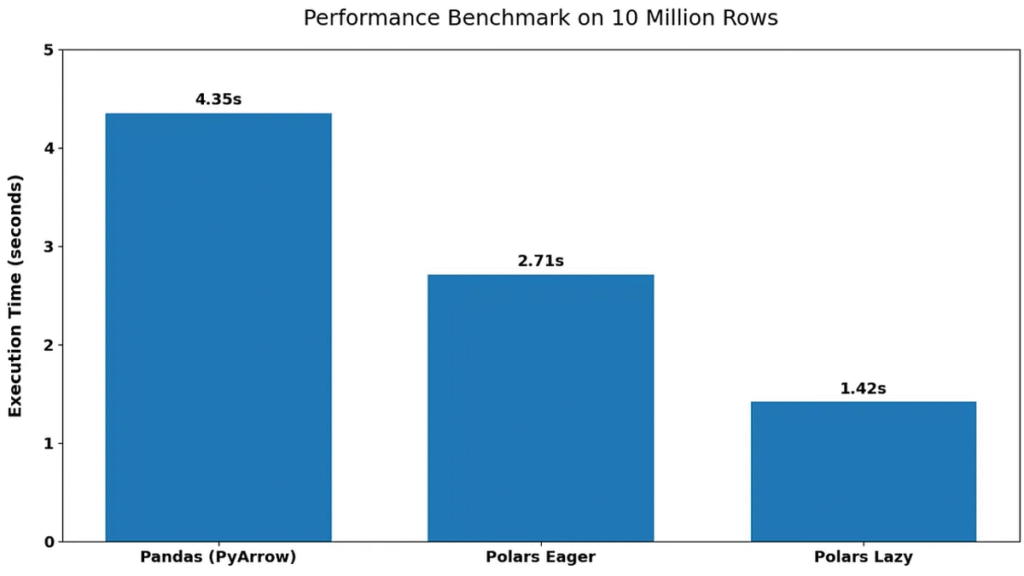
Pandas (PyArrow): 4.35 seconds
Polars Eager: 2.71 seconds
Polars Lazy: 1.42 seconds
The performance gap is immediately evident between the libraries. Polars significantly outperforms Pandas in both execution modes, with the lazy execution model achieving the best performance.
Polars Eager execution is approximately 1.6× faster than Pandas, while Polars Lazy execution achieves nearly 3× speed improvement. This indicates that even without optimization, Polars provides noticeable gains, while its lazy execution model further enhances performance. Another key observation is the consistency of results across runs, suggesting that the benchmarking methodology provides stable and reliable measurements.
Overall, the results clearly demonstrate that Polars is better suited for large-scale data processing tasks, especially when performance is a critical factor.
Why Is Polars Faster? A Look at the Architecture
While the benchmark results clearly show that Polars outperforms pandas, the real difference lies in how these libraries are designed under the hood.
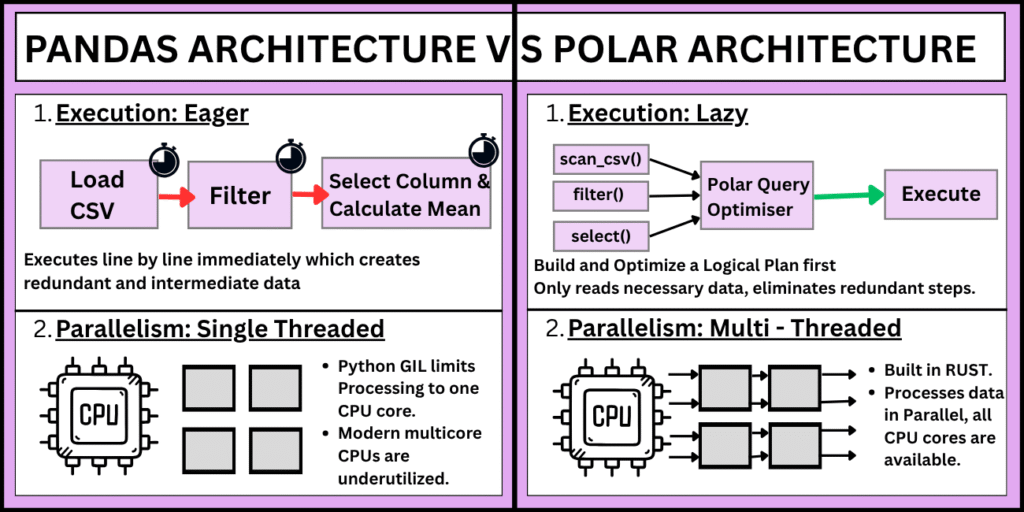
1. Execution Model: Eager vs Lazy
Pandas follows an eager execution model, meaning each operation is executed immediately. While this makes it intuitive, it can lead to unnecessary intermediate computations.
In contrast, Polars supports lazy execution, where operations are not executed right away. Instead, they are collected into a query plan and optimized before execution. This allows Polars to eliminate redundant steps and perform operations more efficiently.
2. Parallelism and Multi-threading
Pandas is largely single-threaded due to Python’s Global Interpreter Lock (GIL), which limits its ability to fully utilize modern multi-core processors.
Polars, on the other hand, is built in Rust and is designed to take advantage of multi-threading by default. This allows it to process data in parallel, significantly reducing execution time for large datasets.
3. Memory Efficiency and Columnar Processing
Polars uses a columnar memory format, which enables better cache utilization and faster data access, especially for analytical workloads.
Although Pandas also operates on column-based structures via NumPy, it is not as optimized for large-scale, high-performance processing. This results in higher memory overhead and slower execution in comparison.
4. Query Optimization
One of the biggest advantages of Polars is its ability to optimize queries. In lazy mode, operations such as filtering, grouping, and aggregation are combined and reordered to minimize data movement and computation.
Pandas does not perform such optimizations automatically, meaning each step is executed independently, often leading to redundant work.
Interpreting the Results
The performance advantage of Polars is not just due to faster execution – it is the result of thoughtful architectural design, including lazy evaluation, parallel processing and efficient memory usage. These features make Polars particularly well-suited for large-scale data processing tasks.
These architectural differences directly explain the observed benchmark results. The faster execution of Polars – especially in lazy mode – is a result of reduced intermediate computations, better CPU utilization through parallelism, and optimized query execution.
This is why Polars Lazy achieved nearly 3× speed improvement over Pandas in the 10 million row benchmark.
Conclusion
This study highlights a clear performance advantage of Polars over Pandas when working with large-scale datasets. Through a 10 million row benchmark, Polars — especially in lazy execution mode demonstrated significantly faster processing, driven by its efficient architecture, parallel execution, and query optimization capabilities.
However, performance is only one part of the decision. Pandas continues to be a strong choice for smaller datasets, rapid prototyping, and workflows that depend on its extensive ecosystem. Polars, on the other hand, becomes increasingly valuable as data size and complexity grow, making it well-suited for performance-critical data engineering tasks.
Ultimately, the choice between Pandas and Polars should be guided by the scale of data, performance requirements, and the specific needs of the workflow.
Frequently Asked Questions (FAQs)
1. When should I choose Polars over Pandas?
Polars is a better choice when working with large datasets (millions of rows), performance-critical pipelines, or complex transformations. Its lazy execution and parallel processing make it ideal for data engineering tasks. Pandas remains suitable for small-to-medium datasets, quick analysis, and workflows that rely heavily on its ecosystem.
2. What is the difference between eager and lazy execution in Polars?
In eager execution, operations are executed immediately (similar to Pandas).
In lazy execution, operations are deferred and optimized into a query plan before execution. This allows Polars to eliminate redundant steps and significantly improve performance, which is why lazy mode achieved nearly 3× speedup in the benchmark.
3. Is Polars always faster than Pandas?
Not always. While Polars excels with large datasets and complex queries, the performance difference may be negligible for small datasets or simple operations. In such cases, Pandas might even feel faster due to lower overhead and familiarity.
4. Does switching from Pandas to Polars require major code changes?
There is a learning curve, but the transition is manageable. Polars has a DataFrame API similar to Pandas, though syntax and concepts (like lazy evaluation) differ. Most common operations-filtering, grouping, aggregation-can be rewritten with moderate effort.
5. Why is Polars faster than Pandas?
Polars gains its performance advantage from:
- Rust-based implementation (no GIL limitations)
Multi-threaded execution
Columnar memory format
Query optimization in lazy mode
These architectural features reduce computation time and improve CPU and memory efficiency.
6. Can Polars fully replace Pandas in production workflows?
It depends on the use case. Polars is excellent for high-performance data processing, but Pandas still dominates in:
- Rich ecosystem support (e.g., integration with many libraries)
- Community adoption
- Legacy codebases
Many teams adopt a hybrid approach, using Polars for heavy processing and Pandas for compatibility.
7. Is Polars suitable for beginners in data science?
Polars is beginner-friendly for those familiar with Pandas, but absolute beginners may find Pandas easier due to its extensive documentation, tutorials, and community support. Once comfortable, learning Polars can significantly enhance performance skills.