
Table of Contents
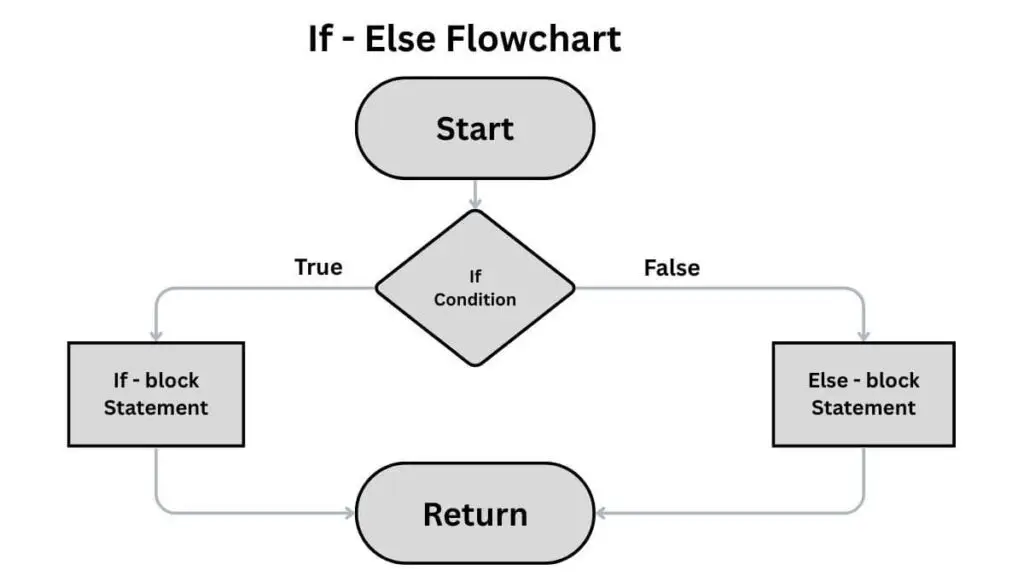
The Python if-else statement is a core managing flow structure used to execute different blocks of code based on whether a specified condition is True or False.
Syntax:
      if condition_is_true:
    # Code to run if the condition is True
              statement_A
      else:
    # Code to run if the condition is False
              statement_B
Why if / else matters
Conditionals let your program:
- Branch logic (do A or B)
- Validate input (accept or reject)
- Apply defaults or fallbacks
- Implement business rules (discounts, access control)
Pythion If Statement
The if statement first evaluates a specified condition, and if the condition is true, the statement is executed. If the condition is false the statement is skipped.
Consider an example below.
Write a Python program to check if the age of the candidate is greater than 18 and print “eligible for voting” if it is true.
					Age = 21
if Age > 18:
     print(“Candidate is eligible for voting”)

#output
#         Candidate is eligible for voting
Proper Indendation must be used while using the If statements That includes
- Using (:) at the end of the if statement line to indicate the start of the intended code block that should be executed if the condition is true.
- There must be white-space under the if statement line.
					# Correct indendation
Age = 21
if Age > 18:
     print(“Candidate is eligible for voting”)

# Incorrect indendation
Age = 21
if Age > 18  # must include (:) at the end of if statement line.
print(“Candidate is eligible for voting”)  # will give indendation error
Elif Statement.
The elif statement in Python is used to check multiple conditions sequentially if the initial if statement has failed. It is used after an if statement and before the else statement.
A code can consist of multiple elif statements for various conditions. It is used when there are several conditions to be checked. It runs from top to bottom and when the condition is satisfied it executes that block and skips the other.
Write a Python program to take two numbers from the user and check if one number is greater than, smaller than, or equal to the other using if-elif statements. Write appropriate output statements.
					A = float(input("Enter first number A: "))
B = float(input("Enter the second number B: "))

if A > B:
    print(f" A is greater than B")

elif A < B:
    print(f" A is smaller than B")

elif A == B:
    print(f" A is equal to B")

# output
#     Enter first number A: 41
#     Enter the second number B: 21
#            A is greater than B
Python Else
The else statement serves as the default path. If no condition is met in the if and elif statements the else part is executed automatically.
Write a Python program to prompt the user for two numbers and determine which one is greater or smaller using if-else statements.
					A = float(input("Enter the number A: "))
B = float(input("Enter the number B: "))

if A > B:
    print(f" A is greater than B")

elif A < B:
    print(f"Result: A is smaller than B")

else:
    print(f"Result: A is equal to B")

# output
#         Enter the number A: 4
#         Enter the number B: 4
#         Result: A is equal to B
You can also write else without including elif.
Write a Python program to check if a number is odd or even.
					num = 4
if num % 2 == 0:
    print("the number is even")
else:
    print("the number is odd")

# output
#         the number is even
Nested IF-else statements.
If there is an if-else statement inside another if-else statement, it is called a nested if-else statement.
Nested if-else is mainly used to check the secondary conditions based on the first condition. The inner conditions are evaluated only if the outer condition is true
Write a Python program to check if a person is old enough to vote (age > 18) AND is a citizen (nationality is ‘USA’). Use a nested if structure to perform the checks sequentially.
					age = 22
nationality = "USA"

if age >= 18:

    if nationality == "USA":
        # Inner Condition (Nationality Check) is True
        print("RESULT: User is Eligible to Vote.")
    else:
        # Inner Condition is False
        print("RESULT: User is old enough, but must be a USA citizen to vote.")
else:
    # Outer Condition (Age Check) is False
    print("RESULT: User is NOT eligible. Must be 18 years or older.")

# output
#           RESULT: User is Eligible to Vote.
Analysis:
- In the above code age = 22 and Nationality = USA.
- The program will then check if the age >= 18, since the age is 21 the condition is satisfied and it proceeds to the inner if condition and checks the nationality. Since the nationality is USA, the condition is true and it will print “User is eligible to vote.
- If the age was less than 18 then the condition in the initial if loop fails and it will directly print the else statement. ( User is not eligible. Must be 18 years or older)
- If the age is greater than 18 but a non-USA nationality then it satisfies the outer if condition but fails in the inner if check and directs the flow to the inner else part and prints “user is old enough but must be a USA citizen to vote”.
Write a Python program for a simple calculator using nested if-else statements.
					# Take the operation choice from the user
operator = input("1.Addition,\n"
                 "2.Subtraction,\n"
                 "3.Multiplication,\n"
                 "4.Division,\n"
                 "5.Modulus\n Enter the operation \n" )

num1 = float(input("Enter the first number: "))
num2 = float(input("Enter the second number: "))

#  Use if-elif-else to determine the operation ---
if operator == '1':
    result = num1 + num2
    print(f"{num1} + {num2} = {result}")

elif operator == '2':
    result = num1 - num2
    print(f"{num1} - {num2} = {result}")

elif operator == '3':
    result = num1 * num2
    print(f"{num1} * {num2} = {result}")

elif operator == '4':
    if num2 == 0:
        print("Error: Division by zero is not allowed.")
    else:
        result = num1 / num2
        print(f"{num1} / {num2} = {result}")

elif operator == '5':
    if num2 == 0:
        print("Error: Modulus by zero is not allowed.")
    else:
        result = num1 % num2
        print(f"{num1} % {num2} = {result}")

else:
    # Executes if the operator input was not 1, 2, 3, 4, or 5
    print(f"Error: '{operator}' is not a valid operation choice.")
The above code performs a simple calculator for operations like addition, subtraction, multiplication, division, and modulus. It exists after each execution and the code must be re-run for a new execution.
Combining Logical Operators in If – Else Statements.
if – else statements can be combined with logical operators like AND, OR, NOT
AND: It returns true if both conditions are true.
OR: Returns true if any one condition is true.
NOT: It reverses the result. (Returns true if the result is false)
Consider the examples below.
A)Write a Python program to check if the students pass in the Python course. If he has scored above 40 and is certified then he passes the course.
B) Write a Python program to check if we should go outside. We go outside if the temperature is above 25 degrees or if it is a weekend
C)Write a Python program to check the payment status. If the user has completed payment, then there is no need for alerts; otherwise display a warning. Use the NOT operator for the purpose.
					print("1. AND Operator")

score = 40
min_score = 36
is_certified = True

if score >= min_score and is_certified:
    print(f"Result: Student passed the course.")
else:
    print("Result: Failed to meet both course requirements.")

# --- 2. OR Operator Demonstration ---
print("\n2. OR Operator")

temperature = 15
is_weekend = False

if temperature > 25 or is_weekend:
    print(f"Result: Going outside!.")
else:
    print(f"Result: Staying inside, conditions not met.")

# --- 3. NOT Operator Demonstration ---
print("\n3. NOT Operator")

is_paid = True

if not is_paid:
    # This block executes if is_paid is FALSE
    print("Result: Warning! Subscription has expired.")
else:
    # This block executes if not is_paid is FALSE (meaning is_paid is True)
    print("Result: Subscription is active.")

# output
#     1. AND Operator
#     Result: Student passed the course.

#     2. OR Operator
#     Result: Staying inside, conditions not met.

#     3. NOT Operator
#     Result: Subscription is active.
Using multiple Logical Operators.
Write a Python program to see the project approval status. The project is approved if the budget is less than 5000 and a security review is not required, or if the client is a priority customer.
					budget = 4500
security_required = True
priority_client = False

if (budget < 5000 and not security_required) or priority_client:
    print("Project approved! Special Handling Required!")
else:
    print("Further review needed. Check budget limits or security status.")

# output
#   Further review needed. Check budget limits or security status.
If-else conditions in one line
You can have both the if and else statements in a single line for simplicity and the shortness of the code. It should be used only if there are a few conditions to check.
Write a Python program to check if the student has passed the test by considering a pass threshold of 40.
					score = 85
pass_threshold = 40

# Single-line if-else (Ternary Operator)
status = "Passed" if score >= pass_threshold else "Failed"
print(f"Result Status: {status}")

# output
#       Result Status: Passed
FAQ (Frequently Asked Questions)
1. What happens if I forget the colon (:) at the end of the if line?
You will get a SyntaxError. The colon (:) is mandatory in Python as it signals the end of the conditional check and the beginning of the indented code block that follows.
2.What is the difference between having two separate if blocks versus using if-elif?
Using two separate if blocks means both blocks might execute if their conditions are met. Using if-elif ensures that only one block will ever execute because the elif is only checked if the preceding if was False.
3. What is the difference between having two separate if blocks versus using if-elif?
Using two separate if blocks means both blocks might execute if their conditions are met. Using if-elif ensures that only one block will ever execute because the elif is only checked if the preceding if was False.
4. What is the main benefit of using a nested if statement?
The main benefit is checking a dependent condition. The inner if statement only gets evaluated if the outer if condition has already been satisfied, making the logic more organized and precise for multi-step decisions.
5. What is a single-line if-else in Python?
A single-line if–else lets you choose a value based on a condition—all in one line.
status = “Adult” if age >= 18 else “Minor”
It means if the age is greater than 18 then the status is adult otherwise the status is minor.