
Table of Contents
What is a String in C
In C a string is not a built-in data type. Instead, a string is represented as a character array terminated by a null character (‘\0’). This null character is what tells the compiler and standard library functions where the string ends.
char name[] = "Qubrica";
Internally, this is stored as:
Q u b r i c a \0
Without ‘\0’, C has no way to determine the end of a string, which leads to undefined behavior.
Declaring and Initializing Strings
There are three types in declaring and initializing Strings.
1. Character Array Initialization
In this method, you define the string as a list of individual characters separated by commas inside curly braces. You must manually include the null terminator (\0) at the end to mark the string’s end.
char str[6] = {'H', 'e', 'l', 'l', 'o', '\0'};
2. String Literal Initialization
This is the most common method where you assign a sequence of characters enclosed in double quotes (” “) to the array. The compiler automatically calculates the size and appends the null terminator (\0) for you. This is the most preferred method for declaring a string.
char str[] = "Hello";
Fixed Size Declaration
Declaring an array with a specific memory capacity (size) explicitly. If the initialized string is shorter than the size, the remaining elements are automatically filled with null terminators.
char str[10] = "Hello";
Occupies 10 bytes; ‘H’ ‘e’ ‘l’ ‘l’ ‘o’ ‘\0’ ‘\0’ ‘\0’ ‘\0’ ‘\0’
Consider a C program below to to print a string
#include <stdio.h>
int main() {
    char str[100];
    printf("Enter a string: ");
    scanf("%s", str);
    printf("You entered: %s", str);
    return 0;
}
Memory Representation of Strings
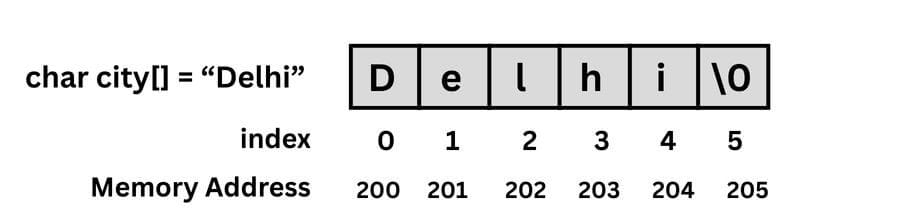
Each character occupies 1 byte. A string occupies memory sequentially. Elements will be stored in adjacent indexes in a particular memory address.
Example:
char city[] = "Delhi";
Reading Strings from Input
1. Using scanf
Reads input only until it encounters the first whitespace (space, tab or newline). It is suitable for single words but cannot read full sentences.
char name[20];
scanf("%s", name);
              // Input: "John Doe" -> Stores: "John"
2. Using gets
Reads a line of text until a newline. It is dangerous because it does not check if the input fits in the array, leading to Buffer Overflows and security crashes. It was removed in the C11 standard.
char name[5];
gets(name); // Input: "Hello World" -> CRASH (Writes past size 5)
3. Using fgets (Recommended)
Definition: The safe alternative to gets. It reads a line (including spaces) but requires you to specify the maximum size to read, preventing memory overflows.
- Syntax:fgets(array, size, stdin);
char name[20];
fgets(name, 20, stdin); // Input: "John Doe" -> Stores: "John Doe"
Printing Strings
1. Using printf
The standard function to print formatted output. It uses the %s format specifier. It does not automatically add a new line at the end.
char str[] = "Hello";
printf("Message: %s", str); // Output: Message: Hello
2. Using puts
A simpler function used specifically for strings. It prints the string and automatically adds a newline (\n) at the end.
char str[] = "Hello";
puts(str);
Accessing String Elements
You access individual characters using their index number inside square brackets [].
Key Rules:
- Index starts at 0:The first character is always at [0].
- Last character: If a string has length N, the last character is at N-1.
- Access Format:stringName[indexNumber]
Modifying the String
Modifying string elements means changing individual characters within an existing string. Since a string in C is just an array of characters, you can overwrite any specific letter by accessing its index number and assigning a new value to it.
Syntax:
stringName[index] = 'NewCharacter';
Consider a program below to demonstrate Accessing and Modifying String elements.
					#include<stdio.h>

int main() {
    char greeting[] = "Hello";
    // 2. Accessing Elements
    printf("First character: %c\n", greeting[0]);  // 'H'
    printf("Second character: %c\n", greeting[1]); // 'e'
    printf("Fifth character: %c\n", greeting[4]);  // 'o'

    // 3. Modifying Elements (Writing)
    // change 'H' to 'J'
    greeting[0] = 'J';

    printf("Modified string: %s", greeting);       // Jello

    return 0;
}
String Operations (with built-in functions)
1. strlen() (String Length):
strlen is a built-in function that calculates the total number of characters in a string (excluding the null terminator \0).
strlen(string_name)
2. strcpy() (String Copy)
It copies the content of one string (source) into another (destination). It copies the contents from the first specified strings and then pastes them to the destination.
strcpy(destination_string, specified_string)
3. strcat() (String Concatenation)
It joins two strings together by appending the source string to the end of the destination string.
strcat(source_string, destination_destination_string)
4. strcmp() (String Compare)
It is used to compares two strings character by character. It returns 0 if they are identical.
(strcmp(str1, str3) == 0)
Write a C program to demonstrate the string operations by using C built-in Functions.
					#include<stdio.h>
#include<string.h>

int main() {
    char str1[50] = "Hello";
    char str2[] = "World";
    char str3[50]; // Empty string for copying

    // 1. (strlen)
    printf("Length of str1: %d\n", strlen(str1));     // 5

    // 2. (strcpy)
    strcpy(str3, str1);
    printf("Copied String: %s\n", str3);             // Hello

    // 3. (strcat)
    strcat(str1, str2);
    printf("Concatenated String: %s\n", str1);      // HelloWorld

    // 4. (strcmp)
    if (strcmp(str1, str3) == 0) {
        printf("Strings are equal");
    } else {
        printf("Strings are not equal");
    }

    return 0;
}

// Strings are not equal
String Operations (Without using built-in functions)
1. Write a C program to find the string length without using the built-in function.
					#include<stdio.h>
int main() {
    char str[] = "qubrica";
    int i = 0;
    // Iterate until the null terminator is found
    while (str[i] != '\0') {
        i++;
    }
    printf("Length of string: %d", i);
    return 0;
}

// Length of string: 7
| Current i | Value str[i] | Check != '\0'? | Action |
|---|---|---|---|
| 0 | ' q ' | True | i becomes 1 |
| 1 | ' u ' | True | i becomes 2 |
| 2 | ' b ' | True | i becomes 3 |
| 3 | ' r ' | True | i becomes 4 |
| 4 | ' i ' | True | i becomes 5 |
| 5 | ' c ' | True | i becomes 6 |
| 6 | ' a ' | True | i becomes 7 |
| 7 | \0 (Null) | False | Loop Ends |
2. Write a C program to copy a string without using a built-in Function
					#include<stdio.h>

int main() {
    char source[] = "Hello";
    char destination[50]; // Must be large enough
    int i = 0;

    // Copy character by character
    while (source[i] != '\0') {
        destination[i] = source[i];
        i++;
    }

    // CRITICAL: Manually add the null terminator
    destination[i] = '\0';

    printf("Copied String: %s", destination);      // Hello
    return 0;
}
| Current i | Value source[i] | Check != '\0'? | Action (Copy) | New State of destination |
|---|---|---|---|---|
| 0 | ' H ' | True | Copy ' H ' to dest[0] | H |
| 1 | ' e ' | True | Copy ' e ' to dest[1] | He |
| 2 | ' l ' | True | Copy ' l ' to dest[2] | Hel |
| 3 | ' l ' | True | Copy ' l ' to dest[3] | Hell |
| 4 | ' o ' | True | Copy ' o ' to dest[4] | Hello |
| 5 | \0 (Null) | False | Stop Loop | - |
3. Write a C Program String Concatenation without built-in Function
					#include<stdio.h>
int main() {
    char str1[50] = "Hello";
    char str2[] = "World";
    int i = 0, j = 0;
    // Step 1: Move 'i' to the end of str1
    while (str1[i] != '\0') {
        i++;
    }

    // Step 2: Append str2 to the end of str1
    while (str2[j] != '\0') {
        str1[i] = str2[j];
        i++;
        j++;
    }

    // Step 3: Close the string
    str1[i] = '\0';
    printf("Concatenated: %s", str1);
    return 0;
}

// Concatenated: HelloWorld
| j | str2[j] (Letter to Copy) | i | Action: str1[i] = str2[j] | State of str1 |
|---|---|---|---|---|
| 0 | ' W ' | 5 | str1[5] becomes 'W' | HelloW... |
| 1 | ' o ' | 6 | str1[6] becomes 'o' | HelloWo... |
| 2 | ' r ' | 7 | str1[7] becomes 'r' | HelloWor.. |
| 3 | ' l ' | 8 | str1[8] becomes 'l' | HelloWorl. |
| 4 | ' d ' | 9 | str1[9] becomes 'd' | HelloWorld |
| 5 | \0 | 10 | Loop breaks | - |
4. Write a C Program to compare two strings without using the built-in Functions
					#include<stdio.h>
int main() {
    char str1[] = "Qubrica";
    char str2[] = "Qubrica";
    int i = 0;
    int areEqual = 1; // 1 = True (Assume equal)

    // Loop as long as neither string has ended
    while (str1[i] != '\0' || str2[i] != '\0') {
        if (str1[i] != str2[i]) {
            areEqual = 0; // Found a difference
            break;
        }
        i++;
    }

    if (areEqual == 1) {
        printf("Strings are Equal");
    } else {
        printf("Strings are NOT Equal");
    }

    return 0;
}

// Strings are Equal
| i | str1[i] | str2[i] | Compare (str1[i] != str2[i]) | Action |
|---|---|---|---|---|
| 0 | ' Q ' | ' Q ' | False (They are equal) | i becomes 1 |
| 1 | ' u ' | ' u ' | False (They are equal) | i becomes 2 |
| 2 | ' b ' | ' b ' | False (They are equal) | i becomes 3 |
| 3 | ' r ' | ' r ' | False (They are equal) | i becomes 4 |
| 4 | ' i ' | ' i ' | False (They are equal) | i becomes 5 |
| 5 | ' c ' | ' c ' | False (They are equal) | i becomes 6 |
| 6 | ' a ' | ' a ' | False (They are equal) | i becomes 7 |
| 7 | \0 | \0 | Loop Condition Fails | Stop Loop |
Applications of Strings
User Input Handling: C strings are used to store and process text entered by users such as names, usernames and passwords in interactive programs.
File Handling and Text Processing: C strings enable reading, searching, and manipulating textual data from files like logs and configuration files.
Command-Line Argument Processing: C strings allow programs to accept and process inputs passed through the command line during execution.
Database Query Construction: C strings are used to dynamically build and execute database queries such as SQL statements.
Network Programming: C strings help transmit and receive textual messages between clients and servers over a network.
Embedded Systems and Firmware: C strings store device messages, sensor information and system status outputs in embedded applications.
Pattern Matching and Searching: C strings are used to search for substrings, match patterns and validate textual input.
Compiler and Interpreter Design: C strings are used to process source code during tokenization, lexical analysis and syntax checking.
Menu-Driven Programs: C strings are used to display menus and options in console-based applications.
Data Validation: C strings help verify the correctness of user input such as email IDs, phone numbers and IDs.
Encryption and Security: C strings are used to handle text during encryption, authentication and secure communication processes.
Frequently Asked Questions (FAQs)
1. How to declare a string in C?
Strings are arrays of characters. When you define a string using double quotes, the compiler automatically appends a Null Terminator (\0) to mark where the text ends in memory.
char str[] = “Hello”;
2) How to parse a string in C?
A string can be parsed using functions like strtok() to split it into tokens based on delimiters.
char *token = strtok(str, ” , “);
3) How to strip a string in C?
Because the C standard library lacks a native function for whitespace removal, developers must implement this logic explicitly. The standard approach requires shifting the character array to eliminate leading whitespace, followed by inserting a null terminator to truncate any trailing spaces.
4) How to convert a string to int in C?
While atoi() is the simplest method for converting text to numbers, it cannot handle errors. But strtol() is a better choice because it can detect wrong characters and prevent crashes from numbers that are too large.
long n = strtol(str, NULL, 10);
str: The string to convert.
NULL: Where to stop (pass NULL if you don’t need to check for errors).
10: The number base (10 for standard decimal numbers)
5) How to find the length of the string?
The length of a string is found using the strlen() function, which counts characters excluding the null terminator.
int len = strlen(str);