
Table of Contents
What is an Array in C?
An array is defined as a sequence of elements of the same type located in adjacent memory addresses. Arrays form the foundation for strings, matrices, data structures and efficient algorithms. It lets you store multiple values under a single variable name.
Why Do We Need Arrays?
Imagine you want to store the marks of 100 students. Without arrays, you would need 100 separate variables, which is impractical.
Arrays help you:
- Store large amounts of data efficiently
- Process data using loops
- Write cleaner and shorter code
- Improve performance and readability
Arrays are essential for:
- Sorting algorithms
- Searching algorithms
- Matrix operations
- Storing real-world datasets
Declaring Arrays in C
An array can be declared by specifying the data type followed by the array name and its size in a square bracket. Array can have different data types like int, float, char etc.
The syntax for declaring an array is:
data_type array_name[size];
					// Example:

int marks[5]={7,9,2,8,0};

float prices[5]={6.5, 0.3,3.1, 1.6, 8.9 };

char vowels[5]={‘a’, ’e’, ‘i’, ’o’, ‘u’}
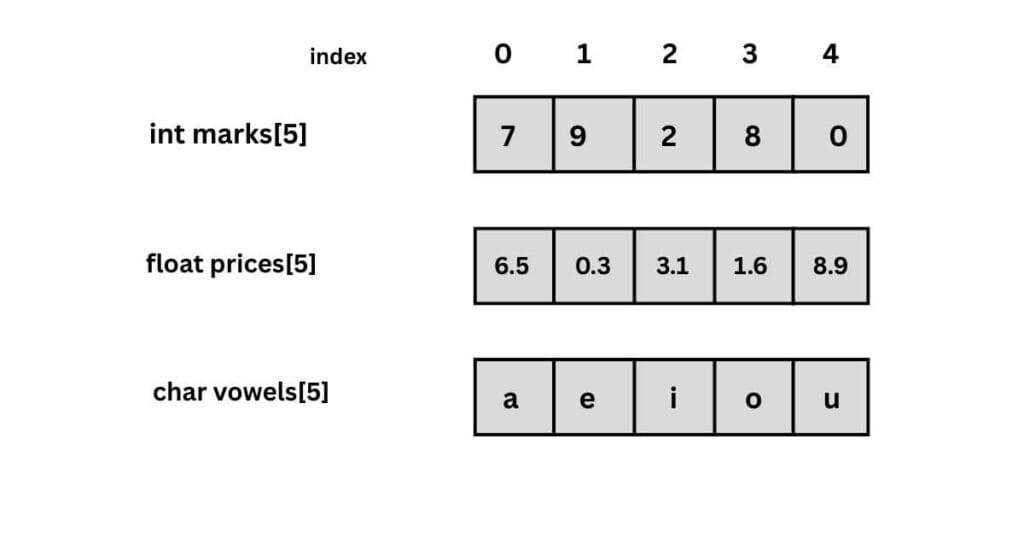
Here:
- int is the data type
- marks is the array name
- 5 is the size of the array
The size must be a positive integer.
Consider the example to declare and print the array elements.
					#include <stdio.h>

int main() {
    int numbers[5] = {10, 20, 30, 40, 50};

    printf("Array Elements: ");

    for (int i = 0; i < 5; i++) {
        printf("%d ", numbers[i]);
    }

    printf("\n");
    return 0;
}

// Array Elements: 10 20 30 40 50
| i value | Check i < 5 | Access numbers[i] | Output |
|---|---|---|---|
| 0 | True | numbers[0] = 10 | 10 |
| 1 | True | numbers[1] = 20 | 20 |
| 2 | True | numbers[2] = 30 | 30 |
| 3 | True | numbers[3] = 40 | 40 |
| 4 | True | numbers[4] = 50 | 50 |
| 5 | False | -- | Loop ends |
Memory Representation of Arrays
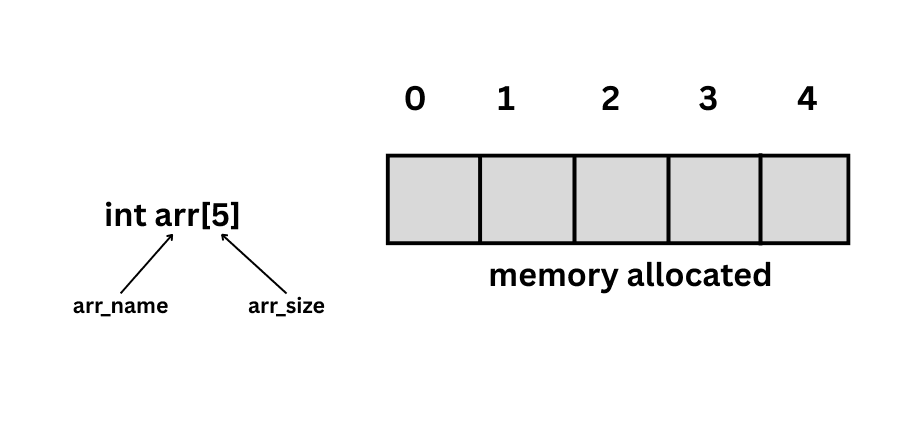
Arrays are stored in contiguous (continuous) memory locations. The operating system allocates a single block of memory to hold all the elements next to each other.
For example:
When int arr[5]; the system allocates memory for five elements. Each element occupies the same memory size depending on the data type. This is why array access is fast and efficient.
Initializing Arrays
Arrays can be initialized at the time of declaration. There are three ways.
Method 1: Direct Initialization
In the direct initialization method we declare the array size followed by its elements.
int numbers[5] = {10, 20, 30, 40, 50};
Method 2: Size Inference
In this method we directly declare the array elements without specifying the size. The compiler automatically calculates the size.
int numbers[] = {1, 2, 3, 4};
Method 3: Partial Initialization
In the partial Initialization method we define the array size as any number, but only add a few elements the remaining elements are set to 0 by default.
int arr[5] = {1, 2};
Accessing Array Elements
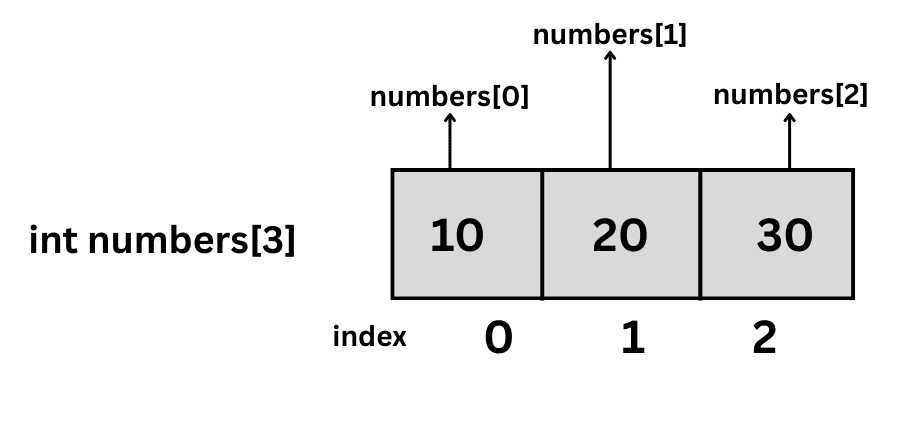
Array elements are accessed by using index values. The indexing starts from 0 and continues up to the last element.
syntax: array_name[index];
					#include <stdio.h>

int main() {
    int numbers[3] = {10, 20, 30};
    printf("%d\n", numbers[0]);   // 10
    printf("%d\n", numbers[1]);   // 20
    printf("%d\n", numbers[2]);   //30

    return 0;
}
Types of Arrays
1. One-Dimensional Arrays
A linear sequence of elements stored in contiguous memory locations. It represents a simple list or a single row of data.
Syntax: type name[size];
Example:
int arr[5];
					#include <stdio.h>

int main() {
    int arr[5];

    // Input Loop
    printf("Enter 5 numbers:\n");
    for(int i = 0; i < 5; i++) {
        scanf("%d", &arr[i]);
    }

    // Output Loop
    printf("Array Elements: ");
    for(int i = 0; i < 5; i++) {
        printf("%d ", arr[i]);
    }

    printf("\n");
    return 0;
}

// Enter 5 numbers:
// 4 8 0 7 9
// Array Elements: 4 8 0 7 9
2. Two-Dimensional Arrays
An array of arrays. It organizes data into a matrix structure consisting of rows and columns.
type name[rows][cols];
					#include <stdio.h>

int main() {
    int matrix[2][3] = {
        {1, 2, 3}, // Row 0
        {4, 5, 6}  // Row 1
    };

    printf("Printing 2D Array:\n");

    // Outer Loop for Rows (0 to 1)
    for (int i = 0; i < 2; i++) {

        // Inner Loop for Columns (0 to 2)
        for (int j = 0; j < 3; j++) {
            printf("%d ", matrix[i][j]);
        }

        printf("\n");
    }

    return 0;
}

// Printing 2D Array:
// 1 2 3
// 4 5 6
| i (Row) | j (Col) | Access matrix[i][j] | Output |
|---|---|---|---|
| 0 | 0 | matrix[0][0] = 1 | 1 |
| 0 | 1 | matrix[0][1] = 2 | 2 |
| 0 | 2 | matrix[0][2] = 3 | 3 |
| 0 | - | Inner loop ends | \n (New Line) |
| 1 | 0 | matrix[1][0] = 4 | 4 |
| 1 | 1 | matrix[1][1] = 5 | 5 |
| 1 | 2 | matrix[1][2] = 6 | 6 |
| 1 | - | Inner loop ends | \n (New Line) |
| 2 | - | Outer loop ends | Stop |
Write a C program to add a 2*2 Matrix using Arrays
A 2 * 2 matric can be added by using the formula sum[i][j] = A[i][j] + B[i][j]
					#include <stdio.h>

int main() {
    // 1. Declare and Initialize two matrices
    int a[2][2] = {
        {1, 2},
        {3, 4}
    };

    int b[2][2] = {
        {5, 6},
        {7, 8}
    };

    int sum[2][2]; // store the result

    printf("Sum Matrix:\n");

    // 2. Loop through rows and columns
    for (int i = 0; i < 2; i++) {
        for (int j = 0; j < 2; j++) {

            // 3. Add corresponding elements
            sum[i][j] = a[i][j] + b[i][j];

            printf("%d ", sum[i][j]);
        }
        printf("\n");
    }

    return 0;
}

// Sum Matrix:
// 6 8
// 10 12
| i | j | a[i][j] | b[i][j] | (a + b) | Output |
|---|---|---|---|---|---|
| 0 | 0 | 1 | 5 | 1 + 5 = 6 | 6 |
| 0 | 1 | 2 | 6 | 2 + 6 = 8 | 8 |
| 0 | - | - | - | Inner loop ends | \n (Next Line) |
| 1 | 0 | 3 | 7 | 3 + 7 = 10 | 10 |
| 1 | 1 | 4 | 8 | 4 + 8 = 12 | 12 |
| 1 | - | - | - | Inner loop ends | \n (Next Line) |
3. Three-Dimensional Arrays
Arrays with three or more dimensions. A 3-D array is often visualized as a collection of 2-D arrays stacked together (like a cube). Multidimensional arrays are used in Scientific computing, 3D graphics and Complex simulations
Syntax: type name[depth][rows][cols];
					#include <stdio.h>

int main() {
    // Declaration: [2] Layers, [2] Rows, [2] Columns
    int arr[2][2][2] = {
        { // Layer 0
            {1, 2},
            {3, 4}
        },
        { // Layer 1
            {5, 6},
            {7, 8}
        }
    };

    // The outer loop selects the layer, the middle loop selects the row and the inner loop selects the column.
    for (int i = 0; i < 2; i++) {
        printf("Layer %d:\n", i);

        for (int j = 0; j < 2; j++) {
            for (int k = 0; k < 2; k++) {
                printf("%d ", arr[i][j][k]);
            }
            printf("\n");
        }
        printf("\n");
    }

    return 0;
}

// Layer 0:
// 1 2
// 3 4

// Layer 1:
// 5 6
// 7 8
| i (Layer) | j (Row) | k (Col) | Access arr[i][j][k] | Output |
|---|---|---|---|---|
| 0 | Layer 0 | |||
| 0 | 0 | 0 | 1 | 1 |
| 0 | 0 | 1 | 2 | 2 |
| 0 | 0 | - | \n (Next Line) | |
| 0 | 1 | 0 | 3 | 3 |
| 0 | 1 | 1 | 4 | 4 |
| 0 | 1 | \n (Next Line) | ||
| 0 | \n (End Layer) | |||
| 1 | - | - | - | Layer 1 |
| 1 | 0 | 0 | 5 | 5 |
| 1 | 0 | 1 | 6 | 6 |
| 1 | 0 | - | - | \n (Next Line) |
| 1 | 1 | 0 | 7 | 7 |
| 1 | 1 | 1 | 8 | 8 |
| 1 | 1 | - | - | \n (Next Line) |
Arrays and Functions
Arrays can be passed to functions to perform operations.
Consider the below code to add the numbers.
					#include <stdio.h>

// Function to calculate sum
int calculateSum(int arr[], int size) {
    int sum = 0;
    for(int i = 0; i < size; i++) {
        sum += arr[i];
    }
    return sum;
}

int main() {
    int numbers[5] = {1, 2, 3, 4, 5};

    // Call the function and store result
    int total = calculateSum(numbers, 5);

    printf("Sum = %d", total);

    return 0;
}

// Sum = 15
| i | Check i < 5 | Access arr[i] | Calculation (sum += arr[i]) | New Sum |
|---|---|---|---|---|
| - | - | Initialization | Initialization | 0 |
| 0 | True | 1 | 0 + 1 | 1 |
| 1 | True | 2 | 1 + 2 | 3 |
| 2 | True | 3 | 3 + 3 | 6 |
| 3 | True | 4 | 6 + 4 | 10 |
| 4 | True | 5 | 10 + 5 | 15 |
| 5 | False | - | Loop Ends | 15 |
Applications
Student Marks Management: Arrays store marks of multiple students efficiently under a single variable name.
Sensor Data Collection: Arrays hold continuous sensor readings such as temperature or pressure over time.
Image Processing: Arrays represent images as grids of pixels arranged in rows and columns.
Inventory Management: Arrays keep track of product quantities and prices in warehouses and stores.
Game Development: Arrays manage player scores, positions, and game states efficiently.
Traffic Data Analysis: Arrays store hourly or daily vehicle count data for traffic monitoring systems.
Banking Systems: Arrays store transaction amounts or balances for fast financial calculations.
Scientific Computing: Arrays store large sets of experimental or simulation data for analysis.
Frequently Asked Questions (FAQs)
1. What is an array in C language?
An array is defined as a sequence of elements of the same type located in adjacent memory addresses. Arrays form the foundation for strings, matrices, data structures and efficient algorithms. It lets you store multiple values under a single variable name.
2. How to find the length of an array in C?
In C, the length of an array can be found using the sizeof operator.
int arr[5];
int length = sizeof(arr) / sizeof(arr[0]);
This works only inside the same scope where the array is declared.
3. What is a 2D array in C?
A 2D array in C is an array of arrays, commonly used to represent tables or matrices.
It stores data in rows and columns.
4. How to delete a normal array in C?
A normal (static) array in C cannot be deleted manually; it is automatically removed from memory when it goes out of scope (for example when a function ends or a block finishes execution).
void example() {
int arr[5]; // normal array
} // arr is automatically deleted here
5. How to reverse an array in C?
					#include <stdio.h>

int main() {
    // 1. Declare array and size
    int arr[] = {1, 2, 3, 4, 5};
    int n = 5;

    printf("Original Array: ");
    for(int i = 0; i < n; i++) printf("%d ", arr[i]);
    printf("\n");

    // 2. Reversal Logic
    for(int i = 0; i < n/2; i++) {
        int temp = arr[i];           // Store first element
        arr[i] = arr[n - i - 1];     // Move last element to first
        arr[n - i - 1] = temp;       // Move stored element to last
    }

    printf("Reversed Array: ");
    for(int i = 0; i < n; i++) printf("%d ", arr[i]);
    printf("\n");

    return 0;
}
| i | Condition i < 2 | Swap Pair (arr[i] ↔ arr[4-i]) | Array After Swap |
|---|---|---|---|
| - | - | Initial State | {1, 2, 3, 4, 5} |
| 0 | True | Swap arr[0] (1) ↔ arr[4] (5) | {5, 2, 3, 4, 1} |
| 1 | True | Swap arr[1] (2) ↔ arr[3] (4) | {5, 4, 3, 2, 1} |
| 2 | False | Loop Ends | {5, 4, 3, 2, 1} |