
Table of Contents
int number = 10;
Why do we Need Variables?
Variables make programs:
- Flexible: You can store values and reuse them anywhere.
- Dynamic: You can change them during program execution.
- Understandable: Meaningful variable names make code easy to read.
Perform calculations: We can assign values to a variable to perform calculations
Control program flow: It refers to controlling the order in which statements in a program are executed using decision-making, looping, and jump statements.
For example, a calculator program needs variables to store numbers entered by the user and a student management system needs variables to store names, marks and roll numbers.
How to Declare and Initialize a Variable in C
- To declare a variable we must specify the data type followed by the variable name. Each variable should have a unique name. They can be short and simple names (a, b) or more descriptive names (max_age, min_age).
- Initializing means assigning a value to the variable. Initialization is important because uninitialized variables contain garbage values, which may lead to unexpected results.
To enhance code readability it is advised to use proper, descriptive names for variables as this allows anyone debugging the code to instantly understand the variable’s purpose and function.
					// syntax
datatype variable_name


int data;
float price;
char grade;

// you can also assign values to the variables at the same time
int score = 100;
Data Types of Variables in C
C is a statically typed language, which means every variable must have a defined data type. The data type determines the type of value it can store and the total memory allocated to it.
- int stores integer values and allocates 4 bytes of memory.
- float stores decimal numbers and allocates 4 bytes of memory.
- double stores long decimal values and allocates 8 bytes of memory.
- char stores a single character and allocates 1 byte of memory.
int count = 5;
float price = 99.99;
double distance = 1234.56789;
char letter = 'C';
Rules for Declaring a Variable
- A variable name may only contain letters (both uppercase and lowercase), digits and the underscore character.
- The name must begin with either a letter or an underscore.
- Spaces are not permitted in a variable name.
- Variable names in C are case-sensitive meaning that names like ageand Age are treated as two distinct and separate variables.
- Variable names cannot be C language reserved keywords such as int, float, if or while.
					// valid
totalMarks
_age
user1

// invalid
1value
user name
float
Memory Allocation of Variables
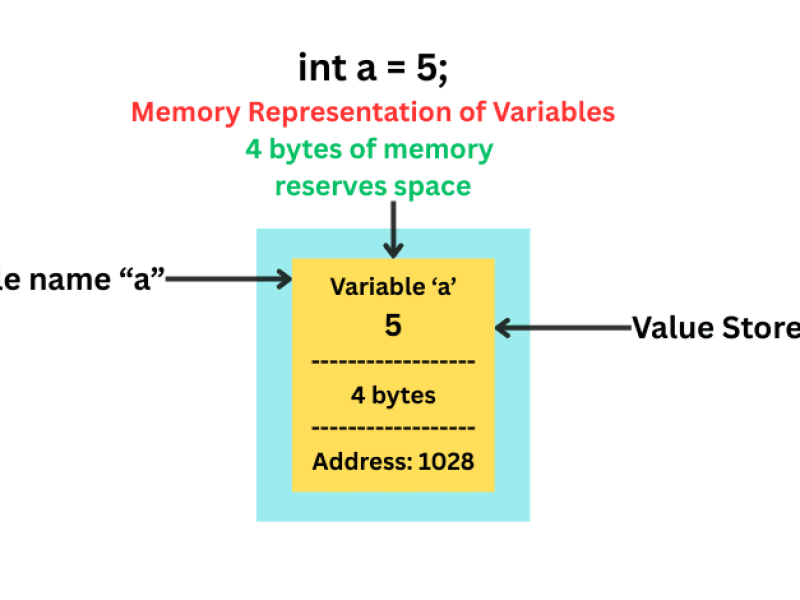
When a Variable is declared the compiler first allocates memory, assigns an address and then associates the address with the variable name. Figure below shows the memory allocation for a variable.
Types of Variables in C based on Scope
Variables are classified based on how they are declared.
We will discuss the 3 main types.
1. Local Variables: They are declared inside a function and they can be accessed only inside that function. It is created when the function starts and destroyed when the function ends.
void display() {
    int x = 10;
}
2. Global Variables: These are declared outside the function and can be accessed from anywhere. These variables exist for the entire program runtime.
int total = 100;

void show() {
    printf("%d", total);
}
3. Static Variables: A static variable in C is a local variable but with a global lifetime. (exists for the entire program).
void counter() {
    static int count = 0;
    count++;
    printf("%d\n", count);
}
Consider a code example below
					#include <stdio.h>

int global_var = 10;                  // global variable

void demo() {
    int local_var = 1;                // Local variable
    static int static_var = 10;       // Static variable
    printf("Local %d\n", local_var);
    printf("Static %d\n", static_var);

 // Re-assign a new different value
    local_var = 99;
    static_var = 99;
    global_var = 99;
}

int main() {
    demo(); // Local: 1, Static: 10. All set to 99 before exiting.
    demo(); // Local: 1, Static: 99. Local is reset. Static keeps 99 from last call.

    printf("\nGlobal Value: %d\n", global_var); // Global is 99 from last call.

    return 0;
}

// Local 1
// Static 10
// Local 1
// Static 99

// Global Value: 99
| Feature | Static Variable | Local Variable | Global Variable |
|---|---|---|---|
| Scope | Visible only within the function where it is defined. | Visible only within the function where defined. | Visible throughout the entire program. |
| Lifetime | Exists for the entire program execution | Created when the function is called, destroyed when the function exits | Exists for the entire program execution |
| Value Persistence | Its value is preserved between function calls. | Value is destroyed when the function exits it is re-initialized/re-created on the next call | Value persists as long as the program runs. |
| Keyword | static | None (Default) | None |
Assign Multiple Variables
Multiple variables of the same type can be declared using commas and the same value can be assigned to multiple variables.
					#include <stdio.h>
int a = 6, b = 5, c = 4;

int main() {
int x, y, z;
x =  y = z = 5;
    printf("%d\n", a + b + c);
    printf("%d", x + y + z);
    return 0;
}
Change Variable Values
The values of variables can be changed by assigning a new value to them. The new value overwrites the previous one.
Consider a C program to swap the numbers between the variables.
In the program below we first assign a value to two variables( a and b) and swap them by taking a third variable (c).
					#include <stdio.h>
int main() {
    int a = 10;
    int b = 20;
    int c;
    printf("Before Swap: a = %d, b = %d\n", a, b);
    c = a;
    a = b;
    b = c;
    printf("After Swap: a = %d, b = %d\n", a, b);
    return 0;
}

// Before Swap: a = 10, b = 20
// After Swap: a = 20, b = 10
Additional Applications
1. Storing User Input: Variables are used to store data entered by the user, such as age, name, marks or salary. This allows programs to process and display user-specific information instead of fixed values.
2. Storing Intermediate Results: During complex computations, variables temporarily store intermediate values, making calculations easier to manage and understand.
3. Managing Real-World Application Data: Variables are widely used to manage and manipulate data in real-world applications such as banking systems, billing software and student record management systems.
4. Tracking Program State: Variables act as counters, flags, and status indicators to track the current state of a program, such as loop counts, error conditions or system states.
5. Working with Arrays and Structures: Variables serve as array indexes and structure members, helping organize and access large amounts of related data efficiently.
6. Memory Management and Performance Optimization: Choosing the correct data type for a variable helps optimize memory usage and improves the program performance, especially in resource-constrained systems.
Frequently Asked Questions (FAQs)
1) How do you declare a variable in a C program?
A variable is declared by first specifying its data type and then its name
Example: int age;
2) What is a static variable?
A static variable preserves its value between function calls and is initialized only once.
3) What is a global variable?
If a variable is declared outside all functions, it becomes a global variable, accessible by any function throughout the program.
4) What is the difference between declaration and initialization?
Declaration: Tells the compiler the variable’s type
Initialization: Assigns a value to the variable
int x = 10
Here int x is declaration and x = 10 is initialization.
5) Can we create variables with the same name in different functions?
Yes. Variables inside functions are local, so each function can have its own variable with the same name without conflict.